Content Gap Analysis With Site Search, Search Console and AI Prompt Data
Blend GA4 site search terms, Search Console rankings and AI prompt research to find the B2B pages buyers want but your site does not have yet.
James Clark
 Reviewed by
Maeva Cifuentes, Founder and CEO
This method finds the topics your buyers already want from you and your site does not cover yet. It blends three first-party data sources. Your internal site search terms show what visitors typed into your search box. Google Search Console shows which of those terms you already rank for. AI prompt research shows which questions buyers ask ChatGPT, Perplexity, Gemini and Google AI Mode about your category. A term that scores high on the first source, low on the second and shows up in the third is a page you should build next.
Competitor keyword tools only show what your rivals rank for. Site search data comes from people already on your site, in their own words. AI prompt data adds the questions that never reach Google at all.
Everything below runs on free tools. You need GA4, Search Console, Data Studio (the product Google called Looker Studio until April 2026) or Google Sheets, and a spreadsheet for prompts.
What each data source tells you
No single source tells you both what people want and whether you already serve it.
| Data source | What it tells you | Where it lives | Main limit |
|---|---|---|---|
| Site search terms | What visitors expected to find on your site | GA4, event view_search_results | Needs enough traffic to show patterns |
| Search Console queries | Where you already rank in Google and at what position | Search Console Performance report | Hides rare queries and has no AI prompt text |
| AI prompts and fan-out queries | What buyers ask assistants and which brands and pages get named | A prompt tracker, sales call notes, manual tests | Answers vary run to run, so you need repeated samples |
Site search data needs volume. B2B SaaS sites with an active blog, help center or resource library usually log enough within one quarter.
Step 1: Track site search in GA4
GA4 tracks site search through enhanced measurement. When a visitor lands on a search results page, GA4 fires an event called view_search_results and stores the phrase in a parameter called search_term. That parameter feeds the "Search term" dimension in reports.
GA4 detects searches from the URL. It looks for a query parameter such as q, s, search, query or keyword by default. Run a search on your own site and look at the address bar. If the URL reads yoursite.com/search?q=pricing, your parameter is "q".
- In GA4, go to Admin and open Data streams.
- Click your web data stream.
- Under "Events", make sure Enhanced measurement is on.
- Click the cog icon and turn on Site search.
- Open Show advanced settings and add your parameter if it differs from the defaults.
- Click Save.
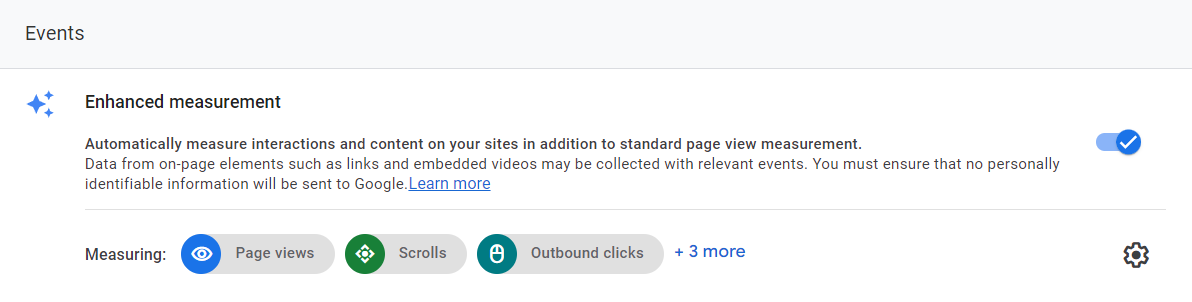
Enhanced measurement switched on in a GA4 web data stream
Some sites load search results without changing the URL. In that case enhanced measurement cannot see the search, so you need a custom event in Google Tag Manager. Analytics Mania has a clear guide to the alternative tracking methods.
Run a test search and check the Realtime report for view_search_results. For a quick look after a day or two, build a free-form exploration with the dimension "Search term", the metric "Event count" and a filter where event name exactly matches view_search_results. The filter removes the blank row that counts every event without a search.
Step 2: Clean the search terms
Raw site search data needs cleaning before you can trust the counts. GA4 treats "Pricing", "pricing" and "pricing " (with a trailing space) as three separate terms. Demand for one topic gets split across rows. You end up underrating the topics your visitors want.
In Data Studio, add GA4 as a data source and create a table with the dimension "Search term" and the metric "Event count". Then replace the dimension with a calculated field named "Search term (clean)" that uses this formula.
TRIM(LOWER(Search term))
LOWER converts every term to lower case. TRIM strips leading and trailing spaces. Nesting one function inside the other applies both.
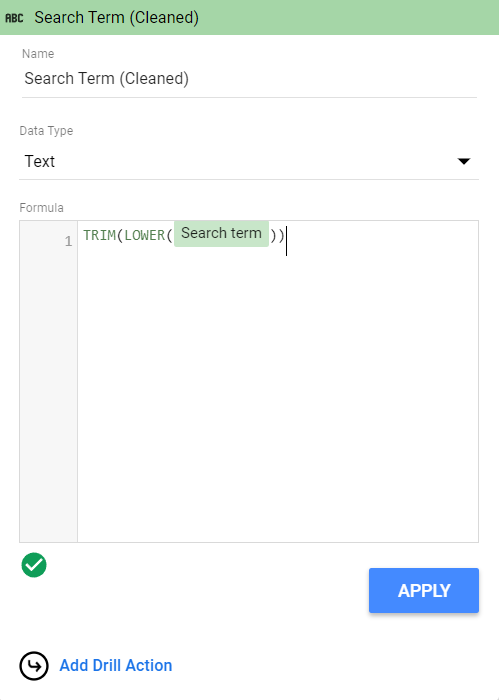
The calculated field that merges case and spacing variants into one term
In Google Sheets, export the exploration and put =TRIM(LOWER(A2)) in a new column, then build a pivot table on the cleaned column that sums event counts. Sheets also makes a third cleanup step easy. Map obvious synonyms and misspellings to one canonical term, such as "soc2", "soc 2" and "soc ii compliance".
Step 3: Pull your ranking data from Search Console
Search Console tells you which terms you already rank for. Writing a new page for a term you already rank well on risks cannibalization, where two of your pages compete for the same keyword.
In Data Studio, add a second data source with the Search Console connector. Choose your property, the Site Impression table and the search type web. Add a table with the dimension "Query" and the metrics "Average position", "Impressions" and "Clicks". In Sheets, export the Queries tab from the Performance report instead.
Google counts AI Mode and AI Overviews activity inside the standard Performance totals. In June 2026 Google also introduced Search Generative AI performance reports for a subset of sites. Industry coverage of the launch reports page, country and device views with no query-level data so far. Search Console therefore tells you whether a page appears in AI features. It cannot tell you which prompts triggered the appearance. That missing piece is why the third source exists.
Step 4: Blend site search and Search Console data
The blend joins your cleaned site search terms to Search Console queries so each term carries both numbers.
In Data Studio, start from the two tables you built.
- Hold Shift and click the GA4 table first, then the Search Console table. The order puts site search on the left.
- Right click and choose Blend data.
- Go to Resource, open Manage blends and edit the new blend.
- Change the join from Cross join to Left outer.
- Set the join condition to "Search term (clean)" on the left and "Query" on the right.
- Save and close.
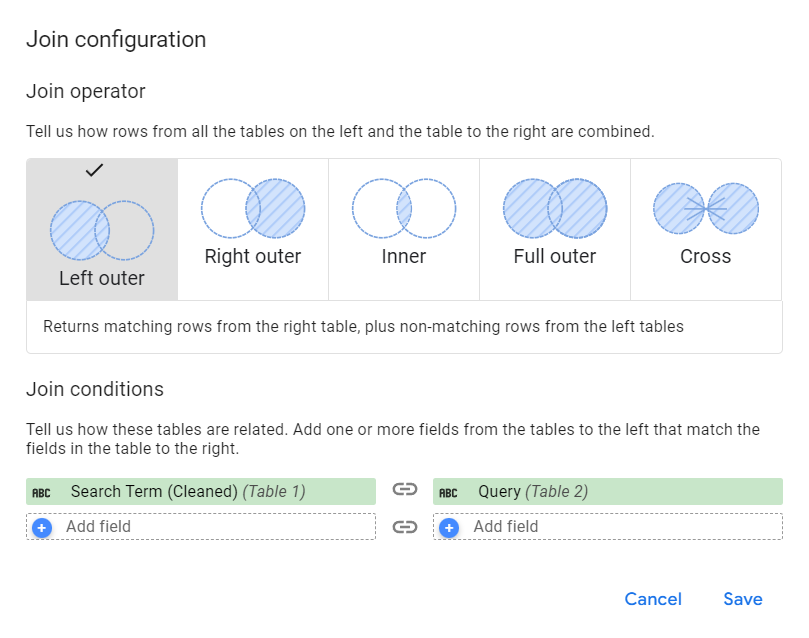
A left outer join keeps every site search term and adds ranking data only where a query matches
The left outer join keeps every term your visitors searched and pulls ranking data only where Google shows a matching query. A blank average position means you do not rank for that term at all. Google's documentation on blends explains the other join types. It also notes that a blend can hold up to five tables and that join conditions only support exact matches. Exact matching explains why the cleaning step comes first.
In Sheets, the same join takes one formula. Next to each cleaned site search term, use =XLOOKUP(A2, GSC!A:A, GSC!C:C, "not ranking") to pull the average position from your Search Console export.
Set the date range to at least one quarter. Shorter windows leave too few searches on B2B sites to separate signal from noise.
Step 5: Add AI search questions as a third source
Buyers now research software in AI assistants, and that demand never appears in either GA4 or Search Console. Google describes AI Mode as breaking a question into subtopics and issuing many searches at once, a process called query fan-out. ChatGPT, Perplexity and Gemini run similar background searches before they answer. Each sub-query is a topic your site needs to answer if you want to be cited.
- Prompt research. List the questions a buyer in your category asks an assistant, from "best SOC 2 compliance software for startups" to "how long does SOC 2 take". Flying Cat's prompt research guide covers how to build and group a prompt set.
- Buyer questions from sales and support. Pull recurring questions from call notes, demo recordings and support tickets. Buyers ask assistants the same things they ask your sales team.
- Fan-out queries. Run your top prompts in each assistant and record the sub-topics the answer covers and the pages it cites. Flying Cat's query fan-out guide shows how to capture these.
- Mention and citation data. Note whether your brand gets named and whether your own pages get cited. A prompt tracker such as Scrunch automates this across assistants and repeated runs.
Add these as rows in the same sheet. Each row gets a source column that reads site search, AI prompt or both, plus a column for whether assistants name you. A topic that appears in site search and in AI prompts with no ranking and no mention is your strongest candidate for a new page.
How to run a content gap analysis on the blended data
Sort the blended sheet by site search volume, then classify each term with the decision table below. The table turns three numbers into one action per row.
| Site search demand | Google ranking | AI prompts and mentions | Action |
|---|---|---|---|
| High | Not ranking | Asked often, you are not named | Create a new page |
| High | Position 11 to 30 | Asked, competitors cited | Refresh and expand the existing page |
| High | Top 10 | Any | Fix findability with internal links, navigation and search results |
| Low | Not ranking | Asked with buying intent | Create a bottom-funnel page anyway |
| High | Not ranking | Broad head term | Check difficulty before you commit |
Row three surprises teams the first time. A term you already rank for that still gets heavy site search usually means visitors cannot find the page from inside the site. The fix belongs in navigation, internal links or your search results page, so skip writing a duplicate.
Row four reflects how B2B buying works. A term with low site search can still deserve a page when it signals purchase intent. Trevor.io's program at Flying Cat deliberately chose low-volume bottom-funnel terms such as alternatives and comparison pages. One Trevor.io alternatives page ranked for 426 keywords (Trevor.io case study).
Row five needs judgment. A broad term like "CRM" on a sales tool site pulls heavy site search and sits far out of reach in Google. Narrow it to a long-tail version your site can win, or build the page for existing visitors and expect little organic traffic.
The template below shows the output sheet with illustrative numbers for a compliance software site.
| Term (clean) | Site searches per quarter | Avg. Google position | Seen in AI prompts | Brand named in AI answers | Action |
|---|---|---|---|---|---|
| soc 2 cost | 140 | not ranking | Yes | No | New page |
| soc 2 vs iso 27001 | 85 | 18.4 | Yes | Competitors cited | Expand existing comparison |
| vendor risk assessment template | 60 | 6.2 | No | n/a | Link it from the resources menu |
| hipaa compliance checklist | 25 | not ranking | Yes | No | New template page |
| compliance | 210 | not ranking | No | n/a | Too broad, skip |
How Flying Cat uses first-party demand on client accounts
Flying Cat uses this blend as one input to topic planning on every SEO strategy engagement. It sits next to competitor research, keyword mapping and the client's sales knowledge.
Buyer language from the client's own channels has shaped several of Flying Cat's programs. Bizzabo's strategy used sales-call insights to map the ICP's questions, pain points and evaluation triggers. New content followed ICP need and intent strength over raw search volume (Bizzabo case study). For Softr, customer interviews surfaced terms like "client portal" that keyword tools did not show. Those terms then got industry and role modifiers such as "agency client portal" (Softr case study). Leapsome swapped generic top-of-funnel topics, which AI answers can replace, for buying guides, implementation guides, checklists and templates (Leapsome case study).
The AI layer follows the same measurement model Flying Cat uses for AEO and GEO programs. The team tracks AI visibility as how often the brand gets recommended across an agreed prompt set. Citations count when the client's own content is used as a source. Mentions and citations rank ahead of clicks in its reports. Research by Maeva Cifuentes, Flying Cat's founder, supports building pages that rank as well as pages that answer prompts. Across 488 product pages from Forbes Cloud 100 companies, 76% of pages with five or more top-10 keywords reached 10 or more AI citations, against 10% of pages below that threshold (The Search Spot, October 2026). Google rankings remain the entry ticket to AI citations, so the Search Console column keeps its weight in the blend.
Attribution closes the loop. AI visibility does not map neatly to pipeline, so Flying Cat adds a "Where did you hear about us?" field to demo and signup forms. An AI customer service platform for ecommerce brands that the team works with added that question to its web form and began reporting on it in its dashboard in October 2026. Flying Cat's two primary content KPIs stay visitor-to-demo or trial conversion rate and SQL-to-opportunity conversion rate. Average position and click-through rate serve as leading indicators.
When the blend flags an existing page rather than a new one, it moves into Flying Cat's refresh workflow. The team's content refresh strategy explains how it triages those pages into light refreshes, expansions or full rewrites.
How often to rerun the analysis
Rerun the blend every quarter. Site search terms shift with product launches, pricing changes and market news. AI answers shift even faster as assistants change how they search and cite.
Flying Cat lines the rerun up with its quarterly content audit, where the team reviews the top 50 key pages and set next-quarter priorities. The blended sheet supplies new topics, while the audit covers what already exists.
If your site search volume is too low for this method, start with the AI and sales inputs alone. Flying Cat's digital analytics service can set up site search tracking so the first source starts collecting data for next quarter.
FAQ
Can ChatGPT find missing content topics for you?
ChatGPT can compare your sitemap or page list against a list of buyer questions and suggest topics you have not covered. It cannot see your site search logs or your Search Console data unless you paste them in. Use it to group and label the blended sheet, and keep the source numbers from GA4, Search Console and your prompt tracker.
Which tools do you need for this method?
GA4, Search Console and Data Studio or Google Sheets are free and cover the first two sources. For the AI source, you can test prompts by hand in each assistant or use a prompt tracker such as Scrunch to run them repeatedly and record mentions and citations.
Contributing writer for Flying Cat.
Reviewed by Maeva Cifuentes, Founder and CEO of Flying Cat. She leads SEO and AI search strategy for B2B SaaS companies including D2L, Klaviyo, CoVet and Blue J.